
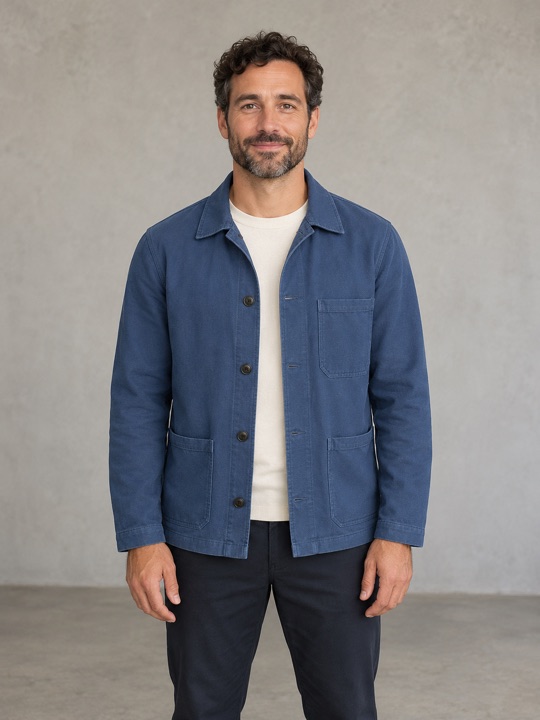
Clear face, natural light
Choose a sharp, forward-facing portrait with both eyes visible. Even lighting makes facial details easier to see.
Turn yourself and your friends into the band. Upload your photos, choose your roles, and make a 15-second Tiny Desk-style performance with music.
Lead singer
Your main character
Keys
Optional band member
Saxophone
Optional band member
Backing vocal 1
Optional band member
Backing vocal 2
Optional band member
The lead is required. Add anyone else you want; fictional musicians fill the empty parts.JPG or PNG · up to 10 MB each
Checking studio availability…
Includes the reference soundtrack. AI creates a new performance; exact gestures and lip-sync can vary.
Only upload photos you have permission to use. Terms of Service · Privacy Policy
Your photo is the starting point for the whole performance. Give Outstanding Tiny Desk AI a clear view of each face, with natural light and enough room around the head and shoulders. You do not need a studio portrait: a straightforward phone photo is a useful place to start.
Choose a sharp, forward-facing portrait with both eyes visible. Even lighting makes facial details easier to see.
Skip dim rooms and strong backlighting. If you cannot see the face clearly, pick another photo.
Beauty effects, color overlays and motion blur can hide the features you want the video to use.
A distant face is harder to recognize. Choose a closer original instead of enlarging a tiny face.
Photo selection examples using an AI-generated portrait.
Open your chosen image and look at the eyes, mouth and outline of the face. Are those details easy to distinguish without guessing? Compare it with the clear example above. If several photos are available, favor the one with more even lighting over a dramatic pose. For friends photographed separately, choose pictures with similar framing so you can compare their clarity easily. Keep an untouched copy of each original, and replace any image that looks soft or heavily compressed. A few minutes spent choosing photos gives your Outstanding Tiny Desk AI session a clearer starting point, although it cannot remove the uncertainty that comes with AI video generation.
Start with a lead singer, add band members, or use one group photo. Clear faces and good light make the best starting point.
Choose 480p, 720p or 1080p and check the credit quote. Your performance is 15 seconds in a vertical frame.
Follow progress in My videos, review the result, then download the MP4. Label it as AI when you share.
The fun is in the casting: a familiar face at the microphone, a friend on keys, or an unexpected saxophone player. Outstanding Tiny Desk AI gives you a fixed concert setup, so you can focus on who belongs in the scene instead of writing a detailed production prompt.
Group mode is convenient when everyone is already together in a clear photograph. Arrange your chosen image with the intended roles in mind: the casting order runs from left to right through lead singer, keys, saxophone and two backing singers. Check that every face is visible before you submit.
Individual mode gives you separate photo slots for those parts. Start with the required lead singer, then add the supporting players you want. You can leave optional roles empty; fictional musicians complete the band. Outstanding Tiny Desk AI does not require five uploaded portraits to get started.
Each session is a 15-second vertical video built around an intimate desk-concert scene, with the reference soundtrack included. Picture how your chosen singer and supporting musicians will fit into that small stage. Watch the reference with sound to decide whether its musical mood suits the performance you have in mind.
Use the reference clips to understand the framing and atmosphere, not to predict an identical result. Outstanding Tiny Desk AI creates a new interpretation of the scene. Facial likeness, instrument handling, gestures and lip-sync can vary, even when you use the same photographs again.
The Tiny Desk-style setup brings a singer, keys, saxophone and backing vocals together in one intimate performance. Cast yourself and consenting friends in the scene.
@whyfantasy_ · This external reference demonstrates the style; it is not an output generated by this product.
The studio offers 480p, 720p and 1080p options. Start by deciding how you plan to view the result, then compare the credit amount shown for each setting. Higher resolution changes the output size; it does not guarantee a closer likeness or more accurate movement.
Review your selected photos, confirm you have permission to use them, and check your available balance before starting. Outstanding Tiny Desk AI shows the credits required beside your chosen quality. If that amount changes before submission, you will be asked to review it again. Visit the pricing page to compare the pack with your planned video quality.
Compare credit packsOnce a job starts, open My videos in your account to follow its status and find the finished MP4. You can leave the homepage and return to that list. Watch the entire clip before downloading, paying attention to faces, hands and the timing of the soundtrack.
Share your Outstanding Tiny Desk AI performance as an AI creation and make sure everyone pictured agreed to that use. An included soundtrack is not a transfer of music rights. Check the permissions that apply to your intended post, especially if you plan to use it commercially.
Open My videosIt is a photo-to-video tool for making an original desk-concert scene inspired by the Outstanding meme. Your chosen cast becomes a small soul band. It is an AI recreation, not footage of a real performance.
Yes. Use a group photo with clear faces, or add only the lead singer in individual mode. Empty roles are filled by fictional musicians.
Yes. Your finished video includes the reference soundtrack, so you can watch the performance with music. Before sharing, make sure your use of the song is covered by the permissions you hold and the rules of your chosen platform.
Choose a quality to see the credits required before you start. Credits are deducted when your video begins processing. If generation fails and the failure is confirmed, the credits are returned to your account. You can check the video and credit status in My videos.
No. They show the style of performance you can aim for; they are not videos generated by this tool. Outstanding Tiny Desk is an independent AI creation tool.
No exact match is promised. The clips above are external references. AI identity, movement and lip-sync can vary; use clear photos and review the finished video before sharing.